Blog
Dark Mode Portfolio – Free WordPress Theme Download

About Dark Mode Portfolio
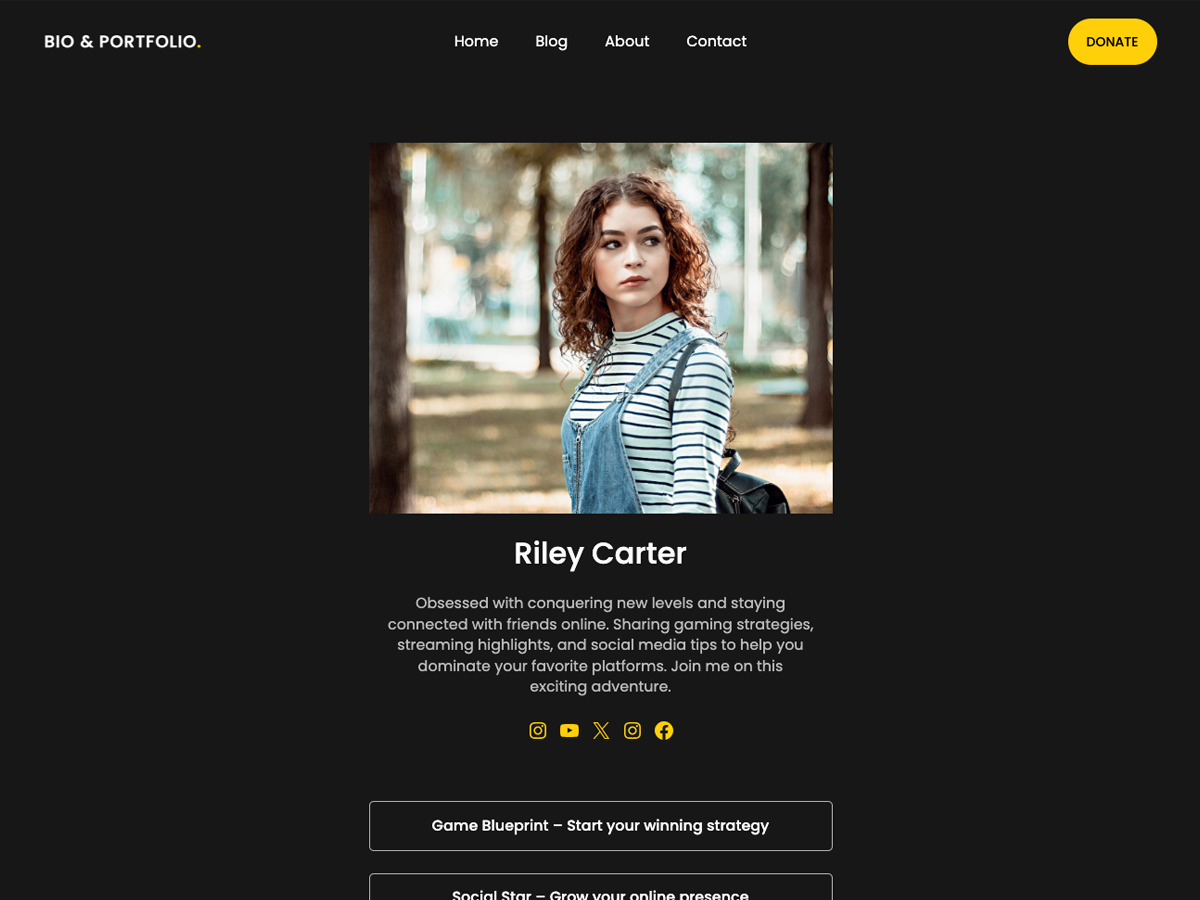
Dark Mode Portfolio is the best free WordPress theme designed as an alternative to LinkTree and Taplink, ideal for bloggers, influencers, streamers, and small businesses. Dark Mode Portfolio makes it easy to create a stunning bio link page where you can showcase social media profiles, exclusive content, and more. This minimal and mobile friendly theme is perfect for one pages, portfolios, outgoing link websites, SoMe, photography, and ecommerce sites. crated with the block builder Gutenberg, customizing your marketing landing page has never been easier. Add affiliate ads and advertisement easily through the banner area to monetize your link tree website. Theme also works great for writing and blogging, with review blocks and much more. Dark Mode Portfolio features a responsive design, dark mode, and SEO optimized schema markup to boost your search engine rankings. Whether you’re a writer, photographer, or corporate company, Dark Mode Portfolio’s simple Dark Mode Portfolio layout ensures your followers can access your content effortlessly. Ideal for Instagram, TikTok, Twitter, and other platforms, this template is also compatible with WooCommerce for those looking to sell online. Choose Dark Mode Portfolio for the fastest, most versatile link page builder experience on WordPress.
Theme Features
- Fully responsive and mobile-friendly design
- Compatible with all major WordPress page builders including Elementor and Gutenberg
- SEO optimized and fast loading performance
- Regular updates and active community support
- One-click demo import available
- WooCommerce compatible for online stores
- Translation ready with multilingual support
Tags & Categories
Block editor patterns, Block editor styles, Blog, Custom background, Custom colors, Custom header, Custom logo, Custom menu, Editor style, Entertainment, Featured image header, Featured images, Footer widgets, Block themes, Full width template, One column, Portfolio, Sticky post, Style variations, Template editing, Threaded comments, Translation ready, Two columns, Wide blocks
How to Install Dark Mode Portfolio
- Download the theme ZIP file using the button below
- Go to your WordPress dashboard → Appearance → Themes
- Click “Add New” then “Upload Theme”
- Select the downloaded ZIP file and click “Install Now”
- Activate the theme and customize it to your needs
Download Dark Mode Portfolio Free
The Dark Mode Portfolio WordPress theme is released under the GPL license. Download it completely free and use it on unlimited websites.
⬇ Free Download – Dark Mode Portfolio
More Free WordPress Themes & Plugins
Looking for more premium WordPress themes and plugins? Visit WP Unlocked for thousands of optimized WordPress resources available for free.